In today’s digital world, computer skills are no longer optional—they’re essential. Whether you’re a student, job seeker, business owner, freelancer, or professional, knowing how to use a computer efficiently can save time, increase productivity, and open new career opportunities.
The good news is that you don’t need to be a technology expert. By learning a few fundamental computer skills, you can confidently handle everyday tasks, work more efficiently, and stay safe online.
In this guide, you’ll discover the 20 essential computer skills everyone should learn and why each one matters.
Why Computer Skills Are Important
Strong computer skills help you:
- Increase productivity
- Improve job opportunities
- Communicate more effectively
- Stay safe online
- Solve common technical problems
- Learn new technologies faster
- Work remotely with confidence
Digital literacy has become a valuable skill in almost every industry.
20 Essential Computer Skills Everyone Should Learn
1. Basic Computer Navigation
Learn how to:
- Use the keyboard and mouse efficiently
- Open and close programs
- Manage windows
- Navigate the desktop
- Use taskbars and menus
These basics form the foundation for everything else.
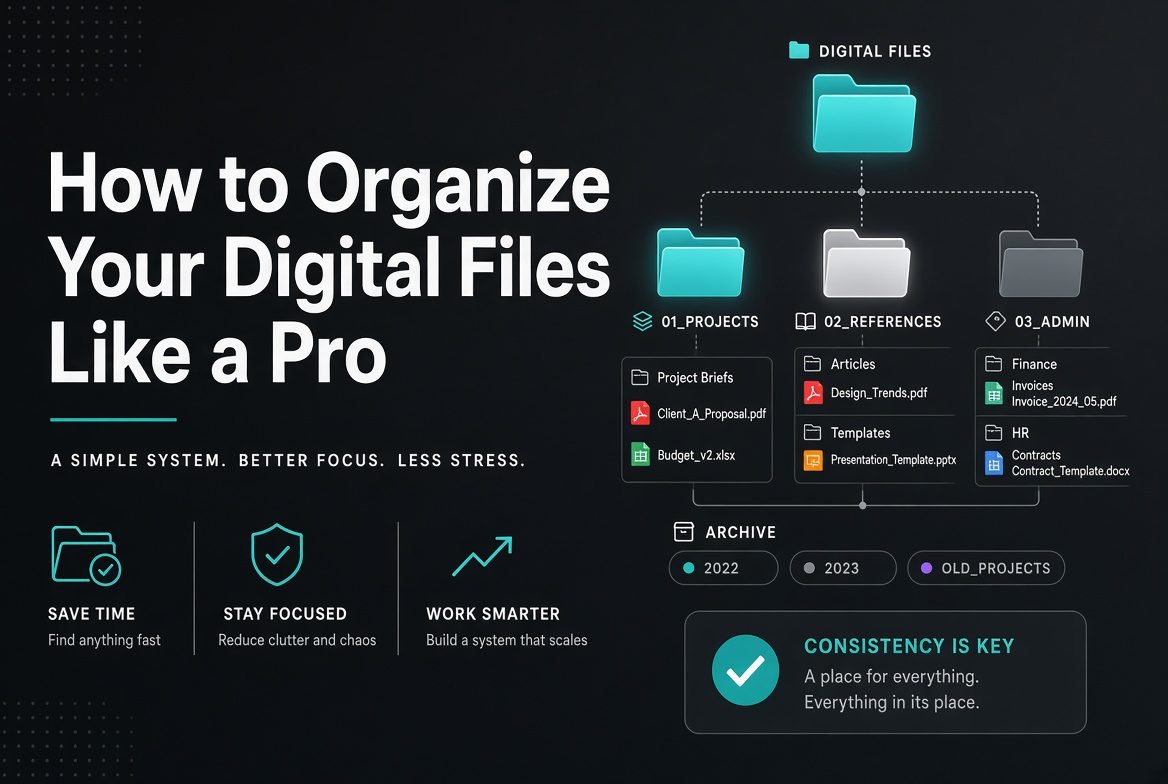
2. File and Folder Management
Know how to:
- Create folders
- Rename files
- Copy and move files
- Delete files safely
- Organize documents
Good file organization saves time and reduces frustration.
3. Internet Browsing
Understand how to:
- Search effectively
- Use browser tabs
- Bookmark websites
- Download files safely
- Clear browsing data
Efficient browsing helps you find reliable information quickly.
4. Email Management
Learn to:
- Send emails
- Reply professionally
- Attach files
- Organize your inbox
- Recognize spam messages
Email remains one of the most important communication tools.
5. Word Processing
Create documents using software such as:
- Microsoft Word
- Google Docs
- LibreOffice Writer
Learn formatting, headings, tables, and page layouts.
6. Spreadsheet Skills
Basic spreadsheet knowledge includes:
- Entering data
- Creating tables
- Using simple formulas
- Sorting information
- Filtering data
These skills are valuable in education, business, and personal finance.
7. Presentation Skills
Learn how to create clear presentations using:
- Microsoft PowerPoint
- Google Slides
- LibreOffice Impress
Good presentations combine simple layouts, visuals, and concise text.
8. Online Safety
Understand how to:
- Identify phishing emails
- Avoid online scams
- Use strong passwords
- Enable two-factor authentication
- Browse securely
Cybersecurity awareness is essential for protecting personal information.
9. Cloud Storage
Learn to use cloud services for:
- File backup
- File sharing
- Collaboration
- Access across devices
Cloud storage makes it easier to work from anywhere.
10. Video Conferencing
Know how to:
- Join online meetings
- Share your screen
- Use your microphone and camera
- Adjust audio settings
- Chat during meetings
These skills are increasingly important for work and education.
11. Basic Troubleshooting
Learn how to solve common problems such as:
- Slow computers
- Internet issues
- Frozen applications
- Printer problems
- Software updates
Simple troubleshooting can often save time and avoid unnecessary repairs.
12. Software Installation
Understand how to:
- Install trusted software
- Update applications
- Uninstall unused programs
- Download software from official sources
Avoid installing software from unknown websites.
13. Computer Security
Protect your computer by:
- Keeping software updated
- Using antivirus protection
- Enabling the firewall
- Locking your device
- Backing up important data
Security is an ongoing process, not a one-time task.
14. Keyboard Shortcuts
Learning shortcuts improves productivity.
Examples include:
- Ctrl + C — Copy
- Ctrl + V — Paste
- Ctrl + X — Cut
- Ctrl + Z — Undo
- Ctrl + S — Save
- Alt + Tab — Switch between open windows
Using shortcuts regularly can significantly speed up everyday tasks.
15. Printing and Scanning
Know how to:
- Connect a printer
- Print documents
- Scan files
- Save scanned documents as PDFs
These skills remain useful in many workplaces.
16. Data Backup
Protect your files by:
- Backing up to external drives
- Using cloud storage
- Scheduling automatic backups
Regular backups reduce the risk of permanent data loss.
17. PDF Management
Learn to:
- Open PDFs
- Fill out forms
- Combine documents
- Convert files to PDF
- Add comments or annotations
PDFs are widely used for professional and educational documents.
18. Basic Photo Editing
Simple editing skills include:
- Cropping
- Resizing
- Adjusting brightness
- Rotating images
- Compressing photos
These are useful for both personal and professional projects.
19. Online Collaboration
Many workplaces use collaborative tools.
Learn how to:
- Share documents
- Edit files with others
- Leave comments
- Track changes
- Manage shared folders
Collaboration skills are valuable for remote teams.
20. Learning New Technology
Technology changes quickly.
Develop the habit of:
- Reading official guides
- Watching tutorials
- Practicing regularly
- Exploring new tools
- Staying informed about updates
Continuous learning helps keep your skills relevant.
Common Computer Mistakes to Avoid
Avoid these habits:
- Using weak passwords.
- Ignoring software updates.
- Saving everything on the desktop.
- Downloading software from unofficial websites.
- Never backing up important files.
- Clicking unknown links or attachments.
- Reusing the same password across multiple accounts.
Good habits improve both productivity and security.
Tips to Improve Your Computer Skills Faster
To build confidence:
- Practice every day.
- Learn one new shortcut each week.
- Explore software features.
- Watch beginner-friendly tutorials.
- Experiment with new tools.
- Solve small technical problems yourself.
- Stay curious about technology.
Consistent practice leads to lasting improvement.
Benefits of Strong Computer Skills
Developing computer skills can help you:
- Work more efficiently.
- Improve academic performance.
- Increase employability.
- Save time.
- Protect your digital information.
- Communicate more effectively.
- Adapt to new technologies.
These skills are valuable in nearly every aspect of modern life.
Frequently Asked Questions
What are the most important computer skills for beginners?
Beginners should focus on file management, internet browsing, email, word processing, online safety, and basic troubleshooting. These skills provide a solid foundation for more advanced learning.
How long does it take to learn basic computer skills?
The basics can often be learned within a few weeks of regular practice. Becoming highly proficient depends on how often you use a computer and the complexity of the tasks you perform.
Do I need to learn programming?
No. Programming is useful for certain careers, but it is not essential for everyday computer use. Most people benefit more from mastering general digital literacy skills first.
Which computer skill is most valuable for jobs?
Employers commonly value skills such as Microsoft Office or Google Workspace proficiency, email communication, spreadsheet basics, online collaboration, file management, and cybersecurity awareness.
Conclusion
Computer skills are essential for success in education, work, and everyday life. By mastering the fundamentals—such as file management, internet browsing, office applications, cybersecurity, troubleshooting, and cloud storage—you’ll become more productive, confident, and prepared for today’s digital world. The key is to practice consistently and continue learning as technology evolves. Even small improvements in your computer skills can make a significant difference in your personal and professional life.