
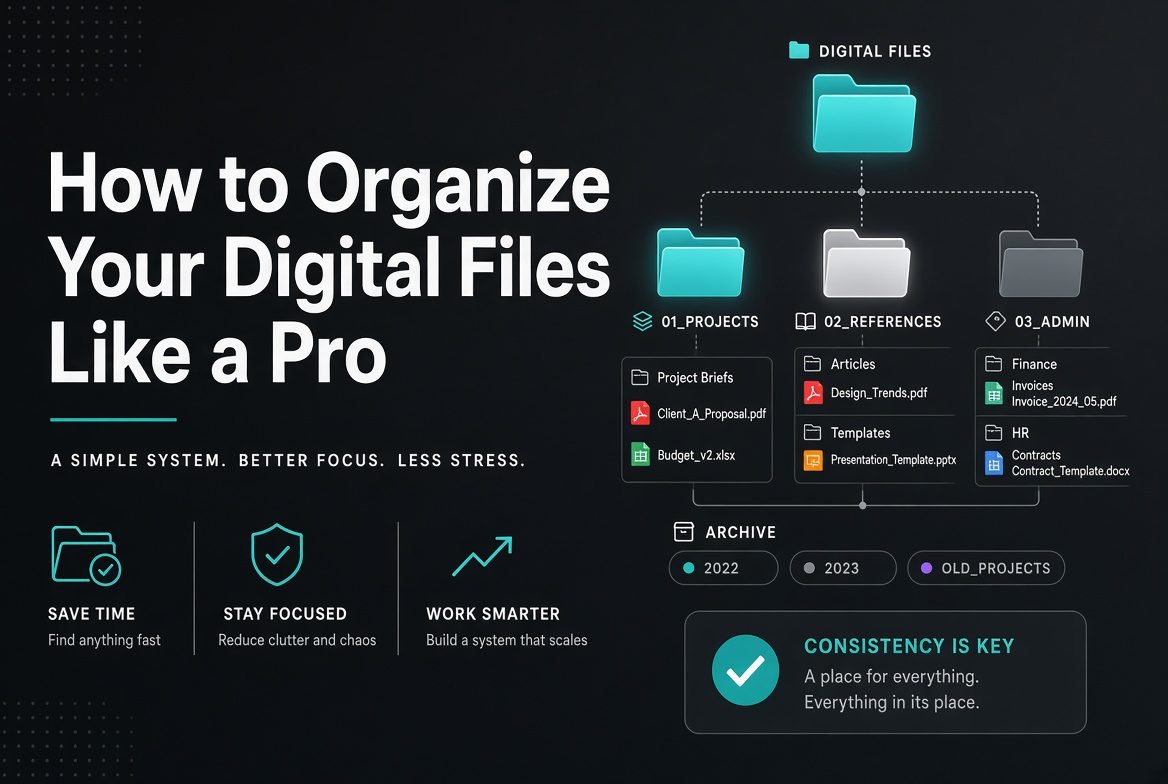
Have you ever spent several minutes searching for an important document, photo, or project file? If so, you’re not alone. As digital files continue to accumulate across computers, smartphones, and cloud storage, staying organized becomes increasingly important.
A well-organized file system saves time, reduces stress, improves productivity, and helps protect valuable information. Whether you’re a student, freelancer, business owner, or office worker, adopting a consistent file management strategy can make finding your files quick and effortless.
In this guide, you’ll learn how to organize your digital files like a pro using practical methods that are easy to maintain.
Why Digital File Organization Matters
Organizing your files helps you:
- Find documents faster
- Improve productivity
- Reduce duplicate files
- Prevent accidental deletion
- Simplify backups
- Save storage space
- Keep important data secure
A clean digital workspace makes everyday tasks more efficient.
Start with a Simple Folder Structure
Avoid creating dozens of random folders. Instead, build a logical hierarchy.
Example Folder Structure
Documents
│
├── Work
│   ├── Projects
│   ├── Reports
│   └── Invoices
│
├── Personal
│   ├── Finance
│   ├── Health
│   └── Education
│
├── Photos
│   ├── 2026
│   ├── Family
│   └── Travel
│
└── Downloads
Create broad categories first, then organize related files into subfolders.
Use Consistent File Names
Random names like:
- Final.pdf
- New Document.docx
- Image1.jpg
quickly become confusing.
Instead, use clear and descriptive names.
Good Examples
- Project-Proposal-2026.docx
- Monthly-Budget-June-2026.xlsx
- Family-Vacation-Karachi-2026.jpg
- Client-Invoice-1025.pdf
A consistent naming system makes searching much easier.
Include Dates in File Names
Using dates helps sort files chronologically.
Recommended Format
YYYY-MM-DDExample:
2026-06-26-Meeting-Notes.docxThis format sorts correctly across most operating systems.
Organize by Category, Not by File Type
Instead of folders like:
- PDFs
- Images
- Word Files
organize by purpose.
Example:
Better
Marketing
    Images
    Reports
    Presentations
rather than:
Images
Reports
PDFs
Grouping files by project or purpose makes them easier to manage.
Clean Your Downloads Folder Regularly
The Downloads folder often becomes cluttered.
Every few weeks:
- Delete unnecessary files.
- Move important files to permanent folders.
- Remove duplicate downloads.
- Empty old installers you no longer need.
Keeping Downloads tidy prevents confusion.
Delete Duplicate Files
Duplicate files waste storage and create uncertainty about which version is current.
Look for duplicates such as:
- Photos
- Videos
- Documents
- Downloads
Keep the latest or most complete version whenever appropriate.
Archive Old Projects
Completed work doesn’t need to remain in your active folders.
Create an archive.
Example:
Archive
   2024
   2025
   2026
This keeps your current workspace uncluttered while preserving older files.
Use Cloud Storage
Cloud storage offers convenient access across devices and can protect your files if your computer is lost or damaged.
Popular options include:
- Google Drive
- Microsoft OneDrive
- Dropbox
- iCloud Drive
Choose a service that fits your workflow and storage needs.
Back Up Your Important Files
Never rely on a single copy of important data.
A good backup strategy includes:
- Cloud backup
- External hard drive backup
- Automatic scheduled backups
Many professionals follow the 3-2-1 backup rule:
- Keep 3 copies of your data.
- Store them on 2 different types of storage.
- Keep 1 copy off-site, such as in secure cloud storage.
Use Search-Friendly Folder Names
Choose names that clearly describe the contents.
Good examples:
- Tax Documents
- Client Contracts
- Marketing Campaigns
- University Assignments
Avoid vague names like:
- Misc
- Stuff
- New Folder
- Temp
Descriptive names improve search results.
Color-Code or Tag Files (If Supported)
Some operating systems and cloud services allow you to:
- Add tags
- Assign colors
- Mark favorites
- Pin important folders
These features make frequently used files easier to locate.
Keep Your Desktop Clean
A crowded desktop makes it harder to find important files.
Aim to keep only:
- Frequently used shortcuts
- Current projects
- Essential folders
Move everything else into organized directories.
Organize Photos Properly
Photos often become one of the largest collections on a device.
A simple structure:
Photos
   2024
   2025
   2026
      Family
      Travel
      Events
Adding locations or event names can make searching even easier.
Secure Sensitive Files
Protect important documents such as:
- Financial records
- Legal documents
- Personal identification
- Business contracts
Use:
- Strong passwords
- Device encryption
- Secure cloud storage
- Two-factor authentication where available
Security is just as important as organization.
Review Your Files Regularly
Set aside time every month to:
- Delete unnecessary files.
- Rename poorly labeled documents.
- Organize new downloads.
- Archive completed work.
- Verify backups.
Regular maintenance prevents clutter from building up.
Common File Organization Mistakes
Avoid these habits:
- Saving everything on the desktop.
- Using inconsistent file names.
- Creating too many nested folders.
- Keeping duplicate files.
- Never deleting old documents.
- Ignoring backups.
- Using vague folder names.
Small changes can make your file system much easier to manage.
Best Practices for Digital File Management
Follow these professional habits:
- Use descriptive file names.
- Maintain a consistent folder structure.
- Back up files regularly.
- Archive old projects.
- Keep Downloads organized.
- Delete duplicates.
- Protect sensitive information.
- Review your file system monthly.
Consistency is the key to long-term organization.
Benefits of an Organized File System
A well-organized digital workspace helps you:
- Save time searching for files.
- Increase productivity.
- Reduce stress.
- Improve collaboration.
- Protect important data.
- Free up storage space.
- Work more efficiently.
Good organization pays off every day.
Frequently Asked Questions
What is the best way to organize digital files?
The most effective approach is to use a clear folder hierarchy, descriptive file names, consistent date formats, and regular maintenance. Organizing files by project or purpose is usually more practical than organizing by file type.
How often should I organize my files?
A quick review once a month is enough for most people. Larger businesses or users who create many files may benefit from weekly organization.
Should I store files in the cloud?
Cloud storage is useful for backups, syncing across devices, and collaboration. For important files, it’s wise to combine cloud storage with a local backup rather than relying on only one location.
What is the 3-2-1 backup rule?
The 3-2-1 rule recommends keeping three copies of your data, stored on two different types of media, with one copy kept off-site, such as in secure cloud storage. This reduces the risk of data loss.
Conclusion
An organized digital file system saves time, improves productivity, and protects your valuable information. By creating a logical folder structure, using consistent file names, maintaining regular backups, archiving old projects, and reviewing your files periodically, you can keep your computer clutter-free and your documents easy to find. Good file management is a simple habit that delivers long-term benefits for both personal and professional use.